
CODE Signing Certificate
A CODE certificate, officially a Code Signing certificate, is a digital certificate used to sign applications, scripts, drivers, and other software distributed over the internet. The digital signature proves who published the software and guarantees that the code has not been altered since it was signed. Let's explore CODE certificates.
Article Contents
- What is a CODE Certificate?
- How does code signing work?
- Why sign your software?
- Types of CODE Certificates
- CODE certificates and Windows SmartScreen
- Cloud Code Signing
What is a CODE Certificate?
A Code Signing certificate is a digital certificate issued to a software publisher – a company or an individual developer – by a trusted certification authority (CA). While an SSL/TLS certificate secures communication between a browser and a web server, a CODE certificate secures the software itself. The developer uses it to attach a digital signature to executable files, installers, scripts, macros, drivers, or firmware before distributing them.
The certification authority issues a CODE certificate only after verifying the existence of the company or the identity of the developer. Thanks to this validation, the signature clearly identifies the publisher, and both the user and the operating system can be sure that the software is authentic and has not been modified in any way during distribution (Code signing – wiki).
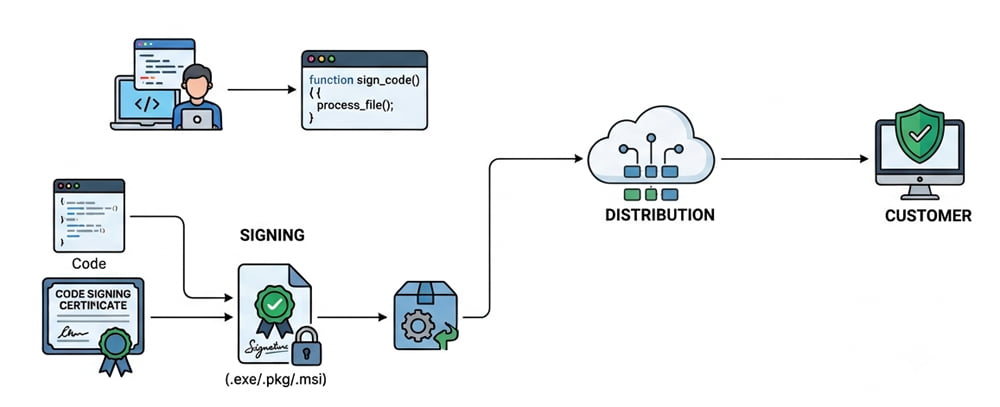
How does code signing work?
Code signing is based on asymmetric cryptography, the same principle used by SSL certificates. The developer owns a pair of keys – a private key and a public key. When signing, a unique fingerprint (hash) of the application file is created and encrypted with the developer's private key. The result, together with the certificate, is appended to the file as a digital signature.
When a user downloads the application, the operating system verifies the signature: it decrypts the fingerprint using the public key from the certificate and compares it with the actual fingerprint of the file. If they match, the code is intact and comes from the publisher stated in the certificate. If even a single byte of the application has been changed, the verification fails and the system warns the user.
Unsigned software is practically undistributable today. Microsoft security mechanisms such as Defender SmartScreen and Smart App Control uncompromisingly block unsigned downloaded applications and warn users against running them. A CODE certificate is therefore an essential tool for every software company and developer.
Signing the code does not change the software itself. It only appends the digital signature to the executable file. An important part of the signature is a timestamp, which proves that the code was signed while the certificate was valid. A timestamped signature remains trusted even after the certificate itself expires.
Why sign your software?
Every software publisher that distributes code or content over the internet needs a CODE certificate. Codes distributed within a company over the intranet should also be signed due to the policies of operating systems such as Windows and macOS. All modern systems prefer signed code to protect users and prevent the spread of malicious software.
Benefits of a CODE certificate
- Proves the identity of the software publisher
- Guarantees code integrity – the software has not been altered
- Removes "Unknown Publisher" warnings during installation
- Protects your name and brand from misuse for counterfeit software
- Increases user trust, downloads, and sales
- Works for Windows and macOS applications
What a CODE certificate does not do
- It does not encrypt the application or its data
- It does not guarantee the code is free of bugs
- It does not replace an SSL certificate for your website
- It does not instantly build SmartScreen reputation
Types of CODE Certificates
CODE certificates differ in the level of publisher validation. Unlike SSL certificates, there is no domain-validated variant – the certification authority always verifies the applicant.
Standard Code Signing (OV)
The standard Code Signing certificate with Organization Validation (OV) is issued to companies and organizations. The certification authority verifies the existence of the company in public registers, its address, and the applicant's authorization. The signature then displays the verified company name as the publisher (CN).
The best-selling CODE certificate today is the Cloud CODE certificate from the certification authority Certum.
Code Signing for Individuals
Independent developers without a registered company can obtain an Code Signing certificate for Individual developer. The certification authority verifies the identity of the developer using an identity document. The signature then displays the verified name of the developer as the publisher. This CODE certificate has identical properties to Standard Code Signing
EV Code Signing
EV Code Signing certificates offer the highest, extended level of company validation (Extended Validation). They are required for signing kernel-mode drivers and system components for Microsoft Windows. They are primarily intended for hardware developers, system software developers, and organizations that require the highest level of company validation.
CODE certificates and Windows SmartScreen
Microsoft Defender SmartScreen is a reputation-based technology that protects Windows users when downloading files from the internet. If an application does not have a sufficient reputation, SmartScreen displays a warning before running it – even if the application is signed. The reputation is built with the number of installations and is tied not only to the software itself but also to the Code Signing certificate used for signing.
Once a reputation is established and installations bypass SmartScreen automatically, new versions of the application can be signed with the same CODE certificate and everything works smoothly. However, when using a new or renewed certificate, the reputation must be built again.
In the past, EV Code certificates provided an instant SmartScreen reputation. Following the Windows security updates released in spring 2026, Microsoft changed its policies and now treats EV Code certificates similarly to standard OV certificates – reputation must be built for EV Code Signing certificates as well. More details can be found on the page Windows SmartScreen filter.
Cloud Code Signing
Since the private key of a CODE certificate must be stored on certified hardware, certification authorities traditionally shipped certificates on physical USB tokens. Cloud Code Signing removes this complication: the private key is generated and stored in the secure HSM infrastructure of the certification authority, and the developer signs the code remotely – from anywhere, immediately after the certificate is issued, and without waiting for a token delivery.
According to the requirements of the CA/Browser Forum, the private key of a CODE certificate must be stored on certified hardware (a physical token or an HSM module). This is why modern CODE certificates are issued mainly as cloud certificates, where the key is stored securely in the certification authority's HSM and the developer signs remotely – with no token shipping and no hardware to manage.
A typical example is the Certum SimplySign service, where signing is authorized via a mobile application and works with standard tools such as Microsoft SignTool. Some Cloud CODE certificates can be integrated into CI/CD build pipelines, making them a practical and cost-effective choice for today's developers.
CODE certificates on the SSLmentor project
On our website, you will find trusted CODE signing certificates from globally trusted certification authorities DigiCert, Sectigo, and Certum. For most developers, we recommend the Cloud Code certificates from the European certification authority Certum, which we offer at the best price on the market.
Where next?
Back to Help
Found an error or don't understand something? Write us!